Monday, March 19, 2012


Diablo 3 goes on pre-order, coming this May 15

Blizzard has already published a pre-order site for the upcoming release of Diable 3 this coming May 15. This was a famous game back in the 90's when I was still in my High School days. We have been waiting for this for a long time now and at last a distinct date have already appeared.
Diablo 3 is free when you sign up for the World of Warcraft annual
pass or you can get separate license for $90SGD (or around Php3,000).
The pre-payment allows you to download the client as early as now but
you can’t still play before the May 15 launch. Visit www.diablo3.com
for details.
iPad 3 Jailbroken

MuscleNerd just tweeted a screenshot of a jailbroken iPad 3, giving hope to early adopters that a jailbreak will eventually come. He did, however, warn that there is a lot of work left before this is usable by the masses, and that there is no estimated time frame for its release. Picture of Cydia running on the new iPad after the jump:
New OS X 10.8 beta adds iOS-like location-based reminders

The second developer preview of OS X Mountain Lion, which was seeded to developers on Saturday,
introduces support for location-based reminders in the Reminders app.
In developer preview 1, users could only create due date-based
reminders.
Interestingly, it appears the Mac itself will track your location
when connected to Wi-Fi and alert you when you arrive at the specified
location, just like an iPhone would.
The reminders can also be synced over the air to iOS devices using
iCloud, meaning you can create a reminder from your computer and be
reminded by your iPhone when you arrive at your destination. I don’t
know about you, but I’m personally looking forward to never again
walking all the way upstairs to track down my iPhone and create a
reminder before I forget what I needed to do.
Apple’s iTunes Page Copies Microsoft Zune Catchphrase

Be it a mere coincidence or blatant copying, the iTunes page on Apple’s website makes use of virtually the same “Your Entertainment, Everywhere” slogan that Microsoft has been using on the Zune website for quite some time. Cory from Zunited was first to notice the lookalike pages, arguing that this isn’t merely a coincidence and that Apple is simply taking notice of some good Microsoft ideas. Even if what Cory is saying is true, however, does it really matter? After all, Microsoft discontinued the Zune Player last October and encouraged its users to transition to Windows Phone. The slogan clearly didn’t help the fate of the Zune, so perhaps Apple can put it to better use.
Tuesday, March 13, 2012
There is an iLandline before iPhone
Apple’s iPhone wasn’t the first foray into the world of voice
communications for the Cupertino firm, and the latest device to show up
on eBay suggests that landline telephones were once an area that Apple
was looking to revolutionize, even all the way back in 1993.
The iPhone is a runaway success. Not even the most diehard Google
Android fan could argue against that. It’s been a phenomenon in so many
ways and with the iPhone 4S sales consistently strong, nothing seems to be able to stand in its way. Not yet, at least.
The iPhone wasn’t the first time Apple
had taken a stab at turning a telephone into something more than just a
way to have two-way voice communication. Apple, even back in the
nineties, was already beginning to explore new uses for an old
technology. One example of that is the Apple WALT. Not heard of it? No, neither had we.
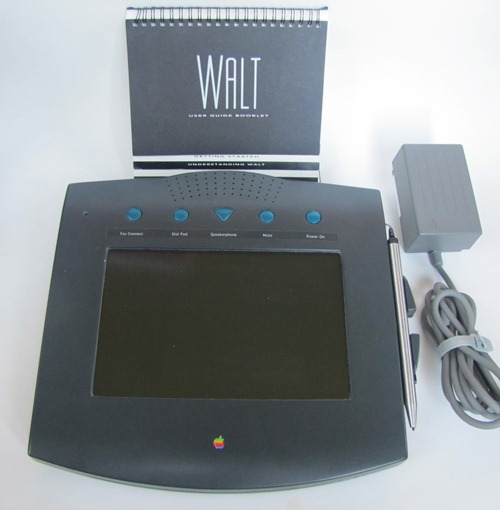 The WALT, apparently, was a landline telephone that Apple announced
at the 1993 Macworld event in Boston. Unfortunately the device never
found its way into stores, which possibly goes some way to explaining
why we had never heard of it.
The WALT, apparently, was a landline telephone that Apple announced
at the 1993 Macworld event in Boston. Unfortunately the device never
found its way into stores, which possibly goes some way to explaining
why we had never heard of it.
WALT, or Wizzy Active Lifestyle Telephone, was a pen-based
touch-screen telephone which offered fax capabilities alongside banking
and contact management. Running a modified version of System
6 and using Hypercard, the device is possibly a forefather of the
iPhones we carry around today, though obviously with more wires!
The reason the WALT is suddenly on everyone’s mind is the fact that one has shown up for auction on eBay.
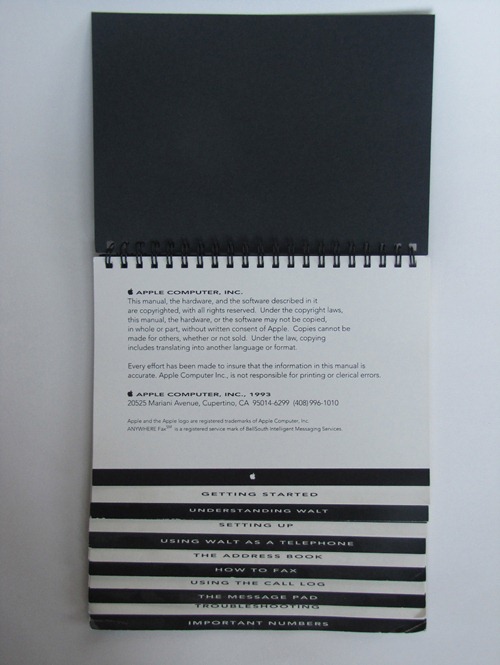
The device in question was far enough through the development cycle to
come with a full, printed manual which suggests that it wasn’t an early
prototype. While not currently working, the auctioneer claims that the
reason for its lack of life is simply a few loose connections which could potentially be fixed.
With a Buy It Now price of $8,000, we won’t be tempted to have a
cheeky bid ourselves, but if you’re a collector then this is certainly
something that is worthy addition to any collection, if only because
most people won’t have heard of it.
Now, if only we could find a few thousand dollars down the back of our sofas…
How To Bypass iOS 5.1 Restriction When Installing iPhoto and iMovie v1.3 On iPhone, iPad, iPod touch Running iOS 5.0.1
For those among us that are hardcore fans of not only Apple products,
but also the software and mobile applications that they make, I am
pretty sure you paid close attention to the announcements made during
the recent media event in San Francisco. The public and media focus
centered predominately around the fact that Apple were launching a new
and improved Apple TV as well as the all new iPad, both of which are set for public release a week from today.
The pre-order section of the Apple website, which allows consumers to
guarantee their new iPad, was expectedly hammered on Wednesday night
and brought about the server and store down issues that we have been
used to in the past. Apple also took the opportunity at the event to
announce the immediate availability of a number of their chargeable
applications which are available through the App Store. Apps such as the
iWork suite, GarageBand and iMovie have been updated for compatibility
with the new iPad Retina display, as well as a new iPhoto mobile app
being launched.

For those who love and can’t live without their jailbreak, the update
of iMovie is bitter sweet. Yes, the app now benefits from a great deal
more functionality and an improved user interface, but it also comes
with a requirement that iOS 5.1 be installed,
meaning jailbroken users who wish to keep their untethered jailbreak on
iOS 5.0.1 couldn’t download it – until now. It seems that the App Store
makes a quick reference check against a .plist entry saved in the
CoreServices directory of the device to determine what version of iOS is
installed. If it the check returns a value less than the minimum
version required, an alert is displayed advising that it requires a
specific iOS version.

For those users who are jailbroken, it is a simple case of using a
program such as iFile, or SSHing into the device and changing the
version string in the SystemVersion.plist, this in turn fools the OS
into believing iOS 5.1 is installed, allowing the download of iMovie. A
quick step by step is listed below.
NOTE: The following instructions requires your iOS device to be
jailbroken. For jailbreaking the latest iOS 5.1 (tethered), follow the
instructions posted here to jailbreak using Redsn0w. For jailbreaking iPhone 4S and iPad 2, you can simply follow our step by step tutorial posted here to jailbreak iOS 5.0.1 using Absinthe on Windows or Mac. Those of you with an iPhone 4, 3GS, iPad 1, and iPod touches can use Redsn0w or Sn0wbreeze to untether jailbreak on iOS 5.0.1.
Step 1: Open up the iFile application on the device to gain access to the file structure. Alternatively, users can SSH into the jailbroken device using a program such as FileZilla or CyberDuck.
Step 2: Navigate to the following directory – ‘/System/Library/CoreServices‘.
Step 3: At the very bottom of the CoreServices directory there will be a file called ‘SystemVersion.plist‘. Open up this file up by selecting it and then tapping on ‘Text Viewer‘.
Step 4: At the bottom of the file is a line of text which reads ‘<string>5.0.1</string>‘.
Edit the file using iFile, or a standard text editing package and amend
the ’5.0.1′ to say ’5.1′. Note: If you are running an earlier version
of iOS, the version number contained within the string tags will reflect
that version.
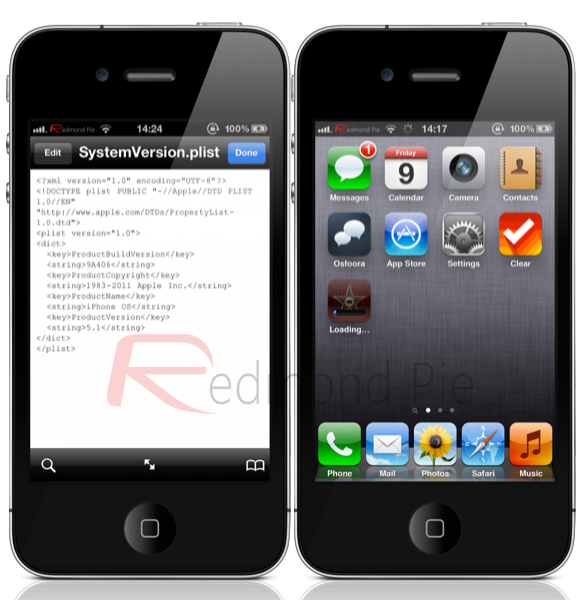
Step 5: Save the file, exit iFile and then respring the device.
Step 6: Head over to the App Store, download the iMovie application and enjoy that cinematic goodness.
That should keep all you jailbroken iMovie lovers happy until the development teams can work their magic on the new iOS 5.1.
(thanks to @cmdshft for the tip)
Subscribe to:
Posts (Atom)